


Turn GitHub Issues into Actionable Dev Insights
Track every minute on GitHub issues without switching tools or missing a single detail
Why Developer Teams Need GitHub Time Tracking
GitHub is the backbone of how engineering teams manage work. But it was never designed to answer the questions that matter most to managers and clients without proper time tracking connected to GitHub, teams face
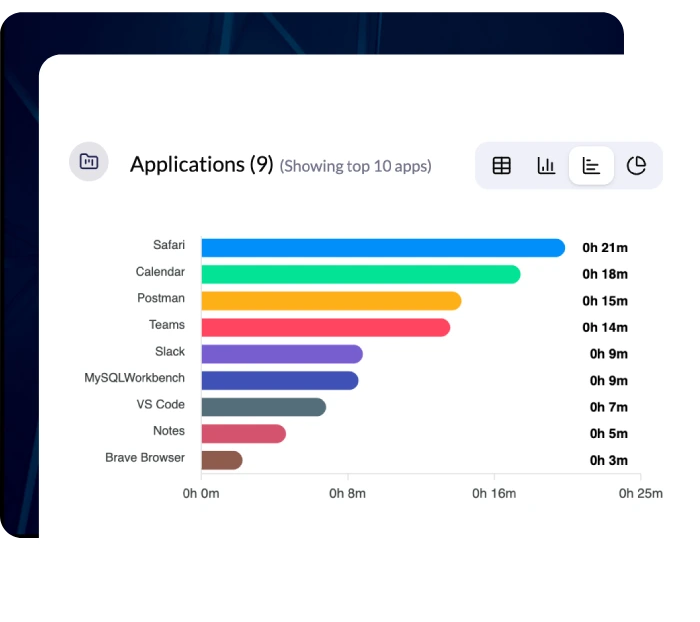
Easily Track Developer Time on Each Task
Gain clear visibility into how much time developers spend on every issue, pull request, and project without manual effort
-
Inaccurate timesheets that don't reflect actual issue-level effort
-
Missed billable hours when dev work isn't logged against the right project
-
Sprint overruns with no clear visibility into what's slowing the team down
-
Manual reporting that wastes hours every week on data that should be automatic
-
No proof of work for clients or stakeholders on hourly or retainer contracts
-
Limited productivity insights beyond just whether a PR got merged
Track Time Directly on GitHub Issues with Monitor360
Monitor360 connects with GitHub, letting your engineering team track time directly on issues and pull requests without ever switching tools.
Work time is recorded automatically with dates, durations, and total hours, giving you complete visibility into who worked on what, how long it took, and whether the project is on budget.
Stay in control with real-time issue updates, smart developer tracking, and clear sprint visibility so you always know what's done, what's falling behind, and what needs immediate attention.

How Monitor360 + GitHub Integration Works
Set up fast and start tracking development work without manual effort. Get clear visibility into time spent, issue progress, and team activity from day one.
Easy Account Connection
Connect Monitor360 with your GitHub workspace in minutes. Authorize via secure OAuth and instantly enable issue-based time tracking and developer productivity monitoring across your repositories

Automatic Project and Team Sync
Import your GitHub repositories, issues, and team members instantly. Track time across issues, sprints, and projects from a single setup no manual configuration needed

Smart Issue Tracking Begins
Assign GitHub issues to your devs and let Monitor360 track time automatically. All work hours sync back to issues, giving you accurate project tracking, developer performance insights, and real-time sprint visibility from day one

Key Features of Monitor360 Time Tracking for GitHub
Gain clear visibility into development time, team activity, and project progress in one place.
Automatic GitHub Issue Time Tracking
Monitor360 automatically tracks time spent on GitHub issues and sub-tasks, giving engineering teams accurate visibility into real developer effort without manual input or time-logging reminders. This improves sprint accuracy, project tracking, and team accountability
Real-Time GitHub Data Synchronization
All issue updates, time data, and project changes sync instantly between Monitor360 and GitHub, ensuring consistent and reliable sprint information across platforms. No sync delays, no data gaps
Developer Productivity Work Insights
Monitor360 gives clear insight into how your development team spends time. You track active coding versus idle time, app and website usage during work with screenshots, issue effort, and productivity patterns across sprints, projects, and developers
Advanced Reports & Analytics
Easily track each developer’s time spent on issues and repositories, and export reports by developers or projects for billable and non billable hours per project. This helps ensure accurate reporting and better budget control
Centralized Project & Developer Dashboard
Get real time data in a centralized dashboard with tracked developer time per sprint or release, productivity insights, idle time tracking, app and website usage monitoring, and screenshot based activity tracking
Who Should Use Monitor360's GitHub Integration?
Built for teams and leaders who need clear visibility into development time and output
Software Development Teams
Track dev time per feature, sprint, or release cycle. Eliminate estimation guesswork with real data
Engineering Managers
See exactly where hours are going, spot blockers early, and make resourcing decisions based on real metrics
Agencies & Dev Studios
Improve billing accuracy, maximize client revenue, and prove the value of your engineering hours with issue-level records
Consulting Firms
Monitor billable dev hours precisely and link every hour to a deliverable with automatic GitHub issue logging
Remote Dev Teams
Clear issue visibility and real-time updates ensure every developer's contributions are tracked regardless of timezone
Enterprise Engineering Orgs
Gain data-driven insights into workforce performance across multiple repositories, squads, and project lines
Your Questions, Answered
Get clear answers to common questions about integrating GitHub with Monitor360
Time is tracked via Monitor360's desktop or web app and automatically synced to your GitHub issues. Every logged session appears linked to the correct issue, so your GitHub project history stays accurate and complete.
Yes. Both parent issues and nested sub-tasks are fully supported. Time tracked on any level syncs back to Monitor360's dashboard with full task hierarchy visible in your reports.
Absolutely. All connections use encrypted OAuth authorization. Monitor360 only accesses the repository and issues data necessary for time tracking — no source code is ever read or stored.
Yes. You can define billable rates per user, per project, or per repository. Monitor360 automatically calculates billing totals based on tracked hours, making client invoicing straightforward and accurate.
You can find real-time reports available directly in the Monitor360 dashboard. You can filter by developer, issue, repository, date range, or projects. Reports are fully exportable for client billing or internal review.
