
Project And Task Tracking Software For Better Workforce Management
Track how your team spends time on each task and deliver projects on time. Everything you need to manage projects and productivity is in one place.
Start a Free Trial
Features Designed for Better Project Management
Plan projects with clear tasks. Assign work, set priorities, and track progress at the task level. Manage multiple projects from one place and keep teams aligned on daily work
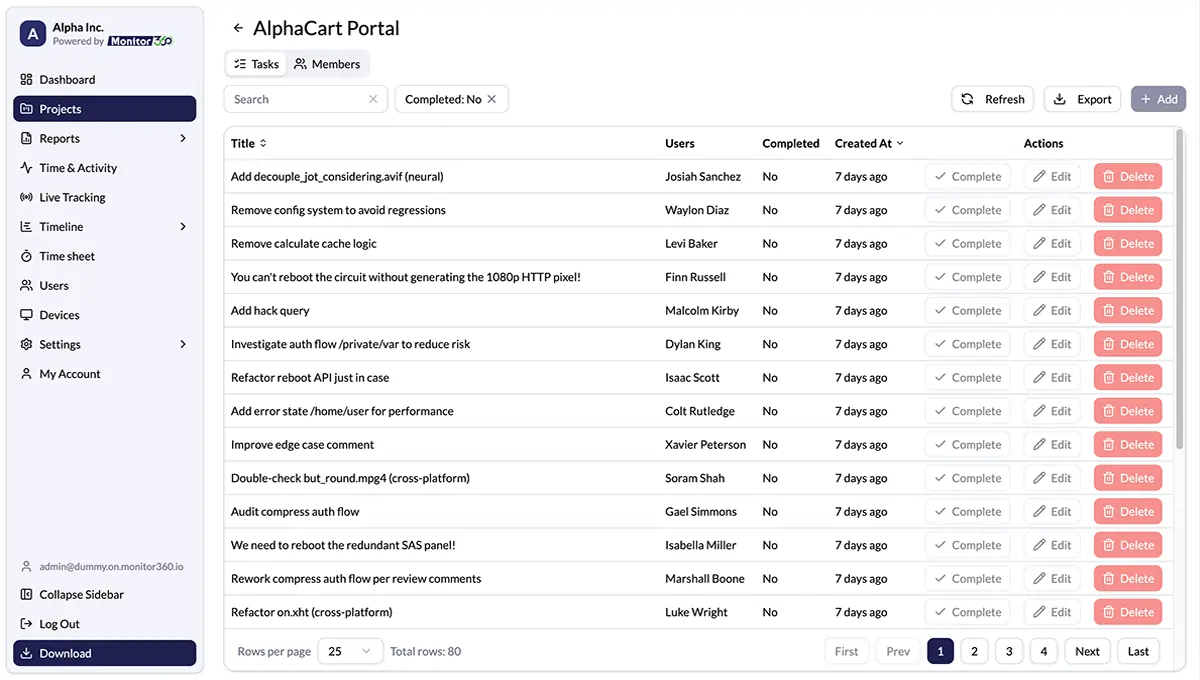
Manage Multiple Projects
Create projects from start to finish with clear tasks, deadlines, and team assignments. Get full visibility, track real-time progress, support unlimited users, and deliver projects on time.
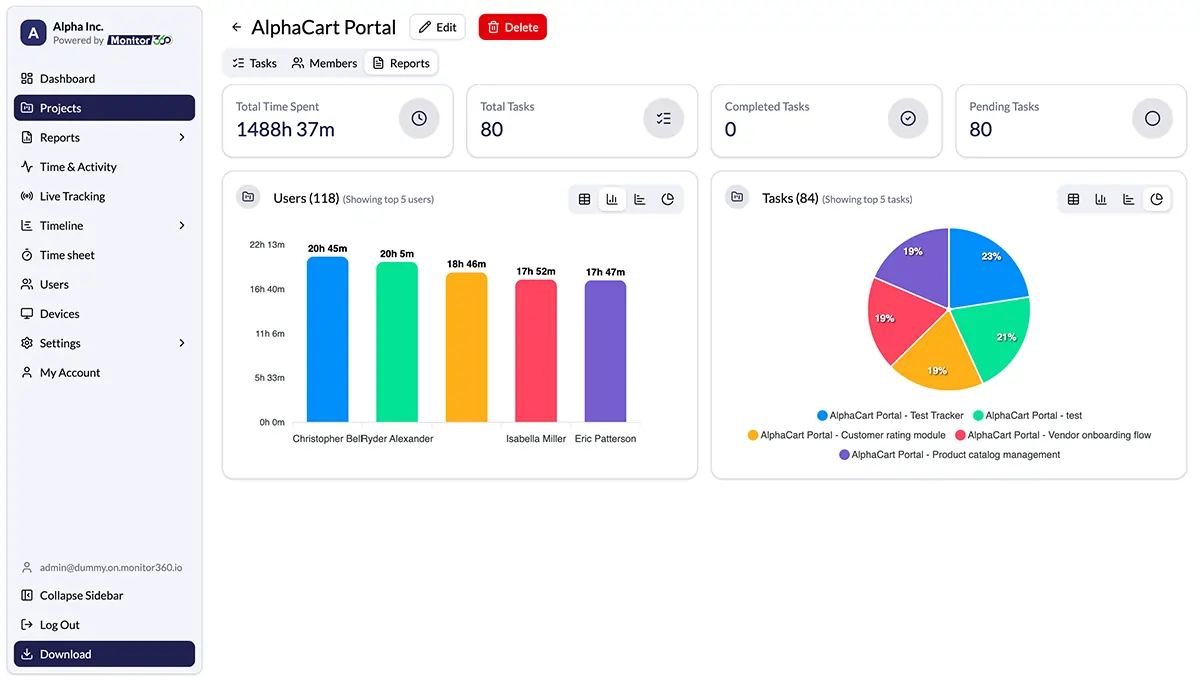
Track Task Level Time
Monitor360 automatically tracks daily working hours for every team member, even without internet access, capturing project and task-level time to improve project planning.
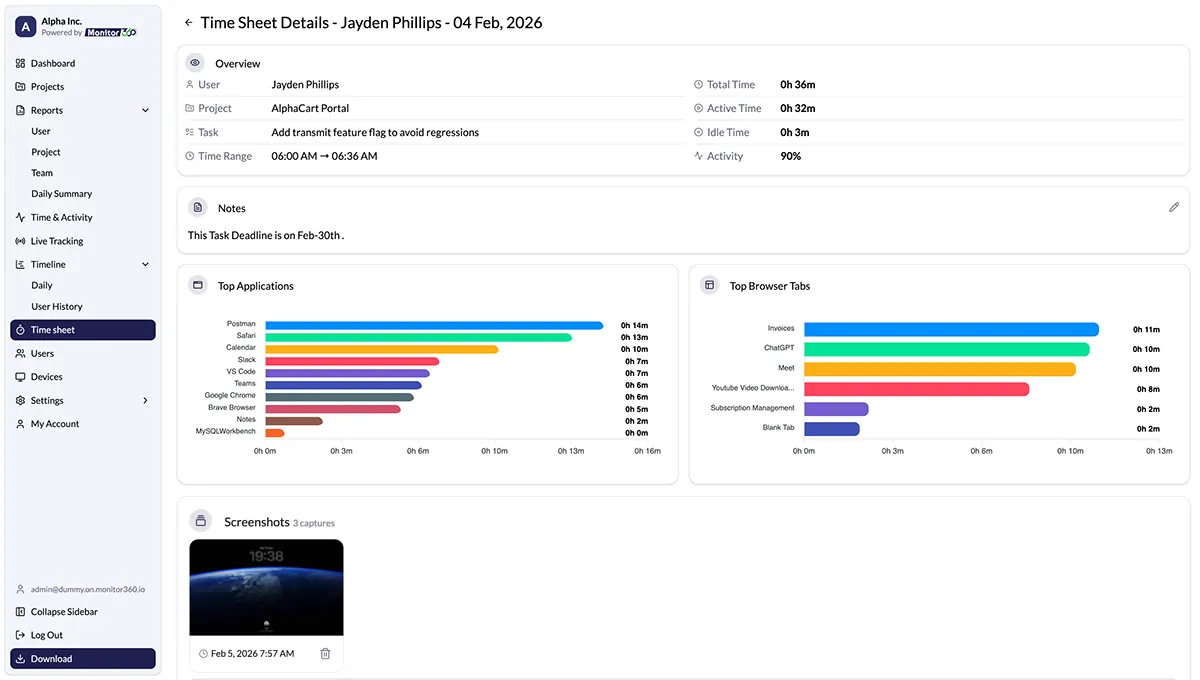
App and Web Usage Tracking
Track project activity by viewing top apps and websites used during work hours. Monitor360 links app and website usage to project time. Measure focus, efficiency, and team productivity with clear activity insights.
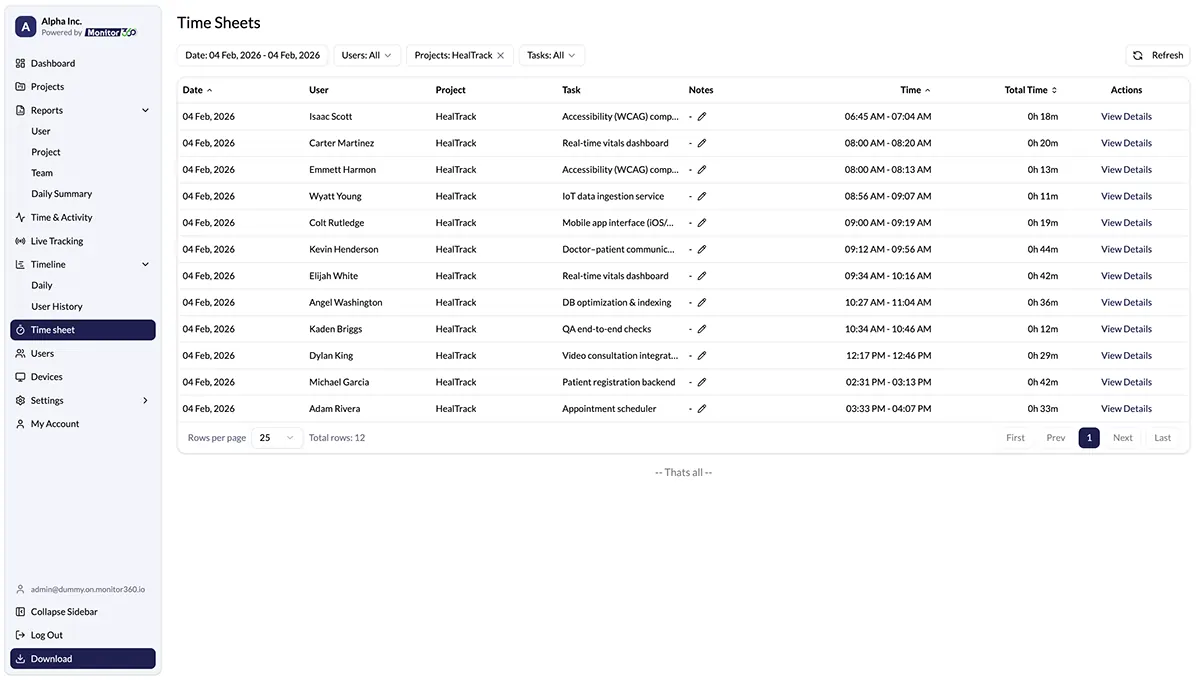
Manage Employee Work Time
It tracks employee hours on projects and tasks. It simplifies approvals and monitors productivity. Through this, you get accurate billing and cost management for your business.
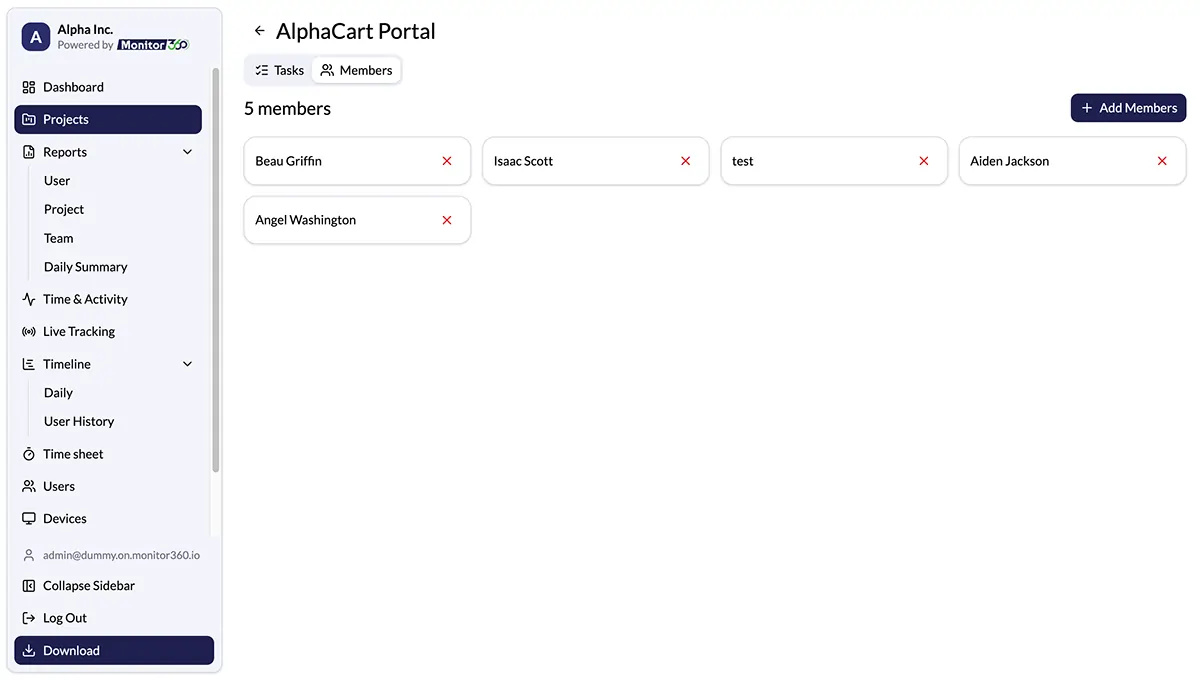
Assign Team Members to Project
Assign and manage team members, tools, and budget across projects.It ensures resources are used well, avoids overload, and keeps projects on schedule and within budget.
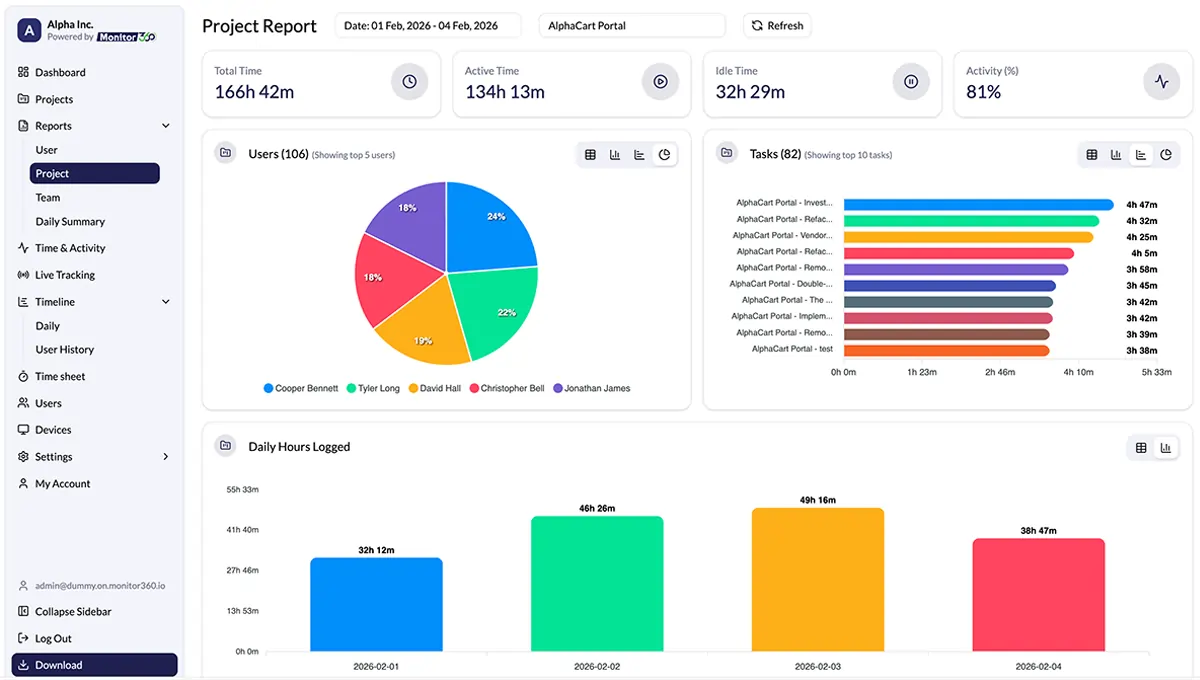
Indepth Work Insights
Generate daily, weekly, and monthly project reports. View productivity metrics by project and employee, export reports for billing or audits, and use insights to improve progress.
Why Project and Task Time Tracking Matters
Get clarity on how work is done and where employees are spending their time
Full project visibility
You track time spent on each project and specific tasks. Decisions rely on accurate time data.
Clear team accountability
You see team capacity in real time. You assign tasks based on available work hours and prevent burnout.
Faster project delivery
Task duration tracking improves project timelines. Projects stay on schedule from start to finish.
Better use of resources
Allocate team members using real-time work hours to balance workloads, avoid overload, and improve resource management across projects.
Smarter decisions with data
Use time tracking data to see how time is spent on tasks and projects, plan more effectively, adjust priorities quickly, and improve project outcomes.
Lower project costs
Check time spent on projects and accurately track work hours to reduce waste, control billable time, and protect budgets.
Monitor360 Employee's Desktop Agent
Empower your team with the Monitor360 Desktop Agent, a lightweight application that runs on employees’ desktops and brings project tracking directly to your dashboard
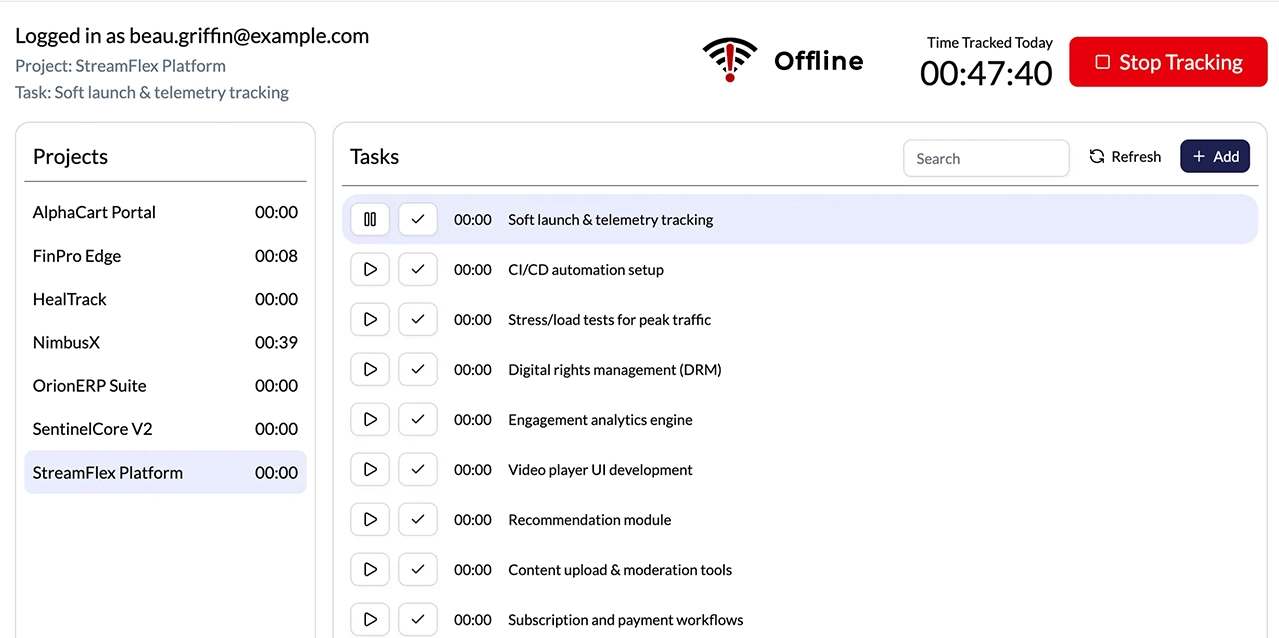
One-Click Task Control
Employees can easily start and stop project tasks instantly from the desktop interface.
Offline Sync
Continue tracking time even without an internet connection. All data syncs automatically when connectivity returns.
Background Tracking
Runs quietly in the system tray while capturing accurate time and activity data.
Project Management Made Simple and Organized
Create Projects
Add new projects quickly and start work in seconds with a clean, intuitive interface.

Structure with Sub-Tasks
Break complex projects into clear, actionable steps.

Assign Team Members
Easily add your team and assign the right people to the right tasks.

Track Everything Live
Monitor time spent on each task and make informed decisions.

Generate Reports
Access detailed project task reports with completion status, assignees, creation dates, and progress insights.

Who Benefits From Task Time Management Software?
Agencies managing client projects
Track time spent on each client, project, and task to keep timelines and budgets on track.
Remote teams
Work time monitoring gives clear visibility across locations. Performance tracking stays consistent.
Software and IT teams
Teams log task-level time across multiple projects. Managers control timelines and resources.
Freelancers and small teams
A free time tracking app for freelancers helps log work hours. Income tracking stays simple.
Consulting firms
Employee time trackers record billable time per consultant. Pricing decisions rely on real data.
Project managers
Project time trackers show progress across teams for Planning and delivery improvement.
Got Questions? We’ve Got Answers!
Find quick answers to common questions and get the clarity you need about Monitor360.
Yes, you can organize and oversee unlimited projects and tasks from a single system, keeping work smooth as your team expands.
Only work activities are tracked. Personal data is never accessed, and monitoring is clear, fair, and safe.
Yes, Monitor360 has offline sync. It records data while offline and updates it automatically when back online.
Yes, Monitor360 tracks time separately for each project and task, allowing you to monitor productivity, meet deadlines, and make adjustments as needed.
