


Odoo Time Tracking Made Easy with Monitor360 Automated Timesheets
Easily track time of odoo projects and manage your employees productivity by Monitor360’s odoo time tracking integration.
Why Teams Choose Monitor360 for Employee Time Tracking in Odoo
Odoo is a powerful ERP, but its native timesheet module is manual and limited. Monitor360 bridges the gap by automating Odoo time tracking. Your data stays accurate, easy to verify, and ready for billing or payroll.
Automate Odoo Time Tracking
Monitor360 starts recording the moment an employee begins work on an Odoo project. No start/stop buttons, no forgotten entries. Every minute logged automatically and synced to Odoo in one click.
Get Accurate Odoo Timesheets
Removing the reason for billing errors. Monitor360 tracks exact work hours by project and task. It then sends clean, auditable timesheet entries to Odoo. This helps reduce human error to near zero.
Generate Complete Productivity Reports
Generate detailed employee productivity reports directly in your Gmail. Track project completion times, active and idle hours, and app and website use. Get clear visibility into billable hours with accurate productivity insights.
Screenshot and Activity Tracking of Odoo Projects
Go beyond hours tracking. Monitor360 takes project screenshots and tracks app and website use during Odoo project work. It gives clear proof of progress and focus, beyond what Odoo provides alone.
How the Monitor360 Odoo Time Tracking Integration Works
Monitor360 connects with Odoo to track tasks, time, and productivity automatically in real time.
Connect Monitor360 to Odoo via API
Integrate Monitor360 with Odoo. The secure connection is established in seconds with no developer required. Monitor360 immediately authenticates and verifies access to your Odoo workspace.
Import Projects, Tasks & Employees
Monitor360 pulls your existing Odoo projects, tasks, and employee list automatically. Select projects to track, assign employees, and finish. No manual re-entry of data you already have in Odoo.
Automatic Time & Activity Tracking Begins
From the moment employees start work, Monitor360 logs time to the correct Odoo project and task. Screenshots are captured at configurable intervals. App and web usage is recorded. All without any action from your team.
Sync Accurate Timesheets to Odoo
Push verified timesheet entries to Odoo with one click. You can also schedule automatic sync at the end of day or week. Every entry includes project, task, employee, and precise hours, ready for billing, payroll, or client reporting.
 All In One
Monitor360 + Odoo: Your Complete Productivity Solution
With Odoo, you can manage tasks and log time manually. But you cannot track employee activity or project progress in real time. Integrating Monitor360 provides a complete productivity solution to manage your workforce and multiple projects efficiently.
Project Management
Basic task and project management, manual updates only
Full project management with automatic task time tracking and real-time updates
Accurate Time Tracking
Employees must log hours manually, prone to errors
Automatic start/stop tracking of task hours, error-free timesheets
Productivity Insights
Limited to task completion status, no efficiency metrics
Detailed dashboards showing active vs idle time, productivity percentages, and task progress
App and Web Usage Tracking
You can not get app and web usage tracking in odoo
Monitor360 tracks app and web usage during tasks for precise activity measurement
Active Screenshots
Can not take screenshots of running project for proof
Capture screenshots during task work for verification and accountability
Live Monitoring
Cannot track real-time employee activity
Real-time monitoring of tasks, time, and employee engagement
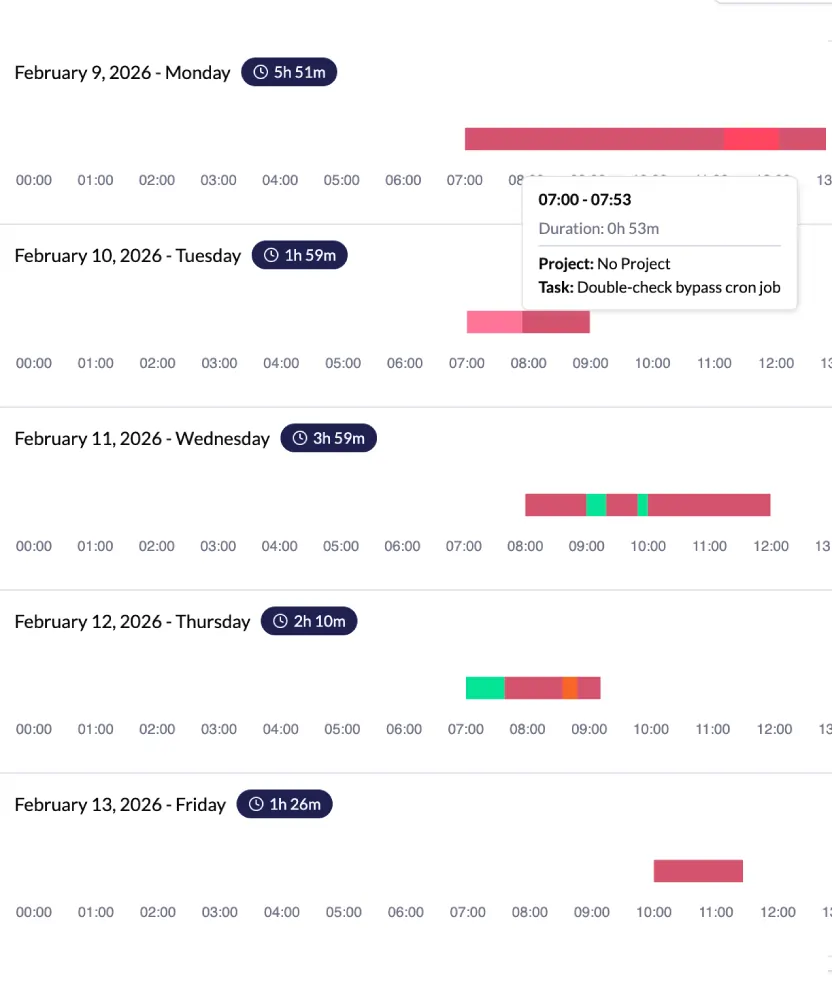
Benefits of Using Monitor360 for Odoo Time Tracking
Automate Odoo time tracking with Monitor360 for precise timesheets. Analyze team activity and progress to improve output and reduce errors.
-
Save time by automating manual time entry
-
Reduce errors in project billing and payroll
-
Increase employee productivity with activity tracking
-
Access comprehensive, real-time reports
-
Improve project visibility and task completion rates
 Who Uses This
Time Tracking That Fits Every Odoo Setup
From consulting firms to IT agencies to distributed remote teams, Monitor360 adapts to how your organization uses Odoo.
Odoo Project Time Tracking for Dev Teams
Software agencies managing sprint tasks in Odoo can use Monitor360 to track developer time per task. It also shows Odoo employee productivity and helps keep clients informed with data-backed progress reports.
Accurate Client Billing with Odoo Time Tracking
Consulting firms that bill by the hour need timesheet accuracy that manual Odoo entry cannot guarantee. Monitor360 automatically logs consultant hours against the right client project in Odoo.
Multi-Location Visibility with Odoo Time Tracking
Retail and distribution teams running Odoo across several locations need oversight that physical presence can't provide. Monitor360 tracks back-office and remote staff activity automatically, from any site.
Odoo Remote Employee Monitoring
Distributed teams use Odoo for project management and get full visibility. Monitor360 adds automated time tracking, live activity dashboards, and async reports for all time zones.
Common Questions About the Monitor360–Odoo Integration
Security, compatibility, data handling, and pricing are the key questions teams have before integrating Monitor360 with Odoo.
Yes.Monitor360 only asks for the API permissions needed for time and project data. All credentials are encrypted during transfer and while stored.
Yes. Monitor360 supports both Odoo Community and Enterprise editions, whether self-hosted or on Odoo.com.
No. Monitor360 only adds new tracked entries going forward and never modifies or duplicates your existing Odoo timesheet records.
Monitor360 offers a 7-day free trial with no credit card required, after which pricing is based on the number of users.
