
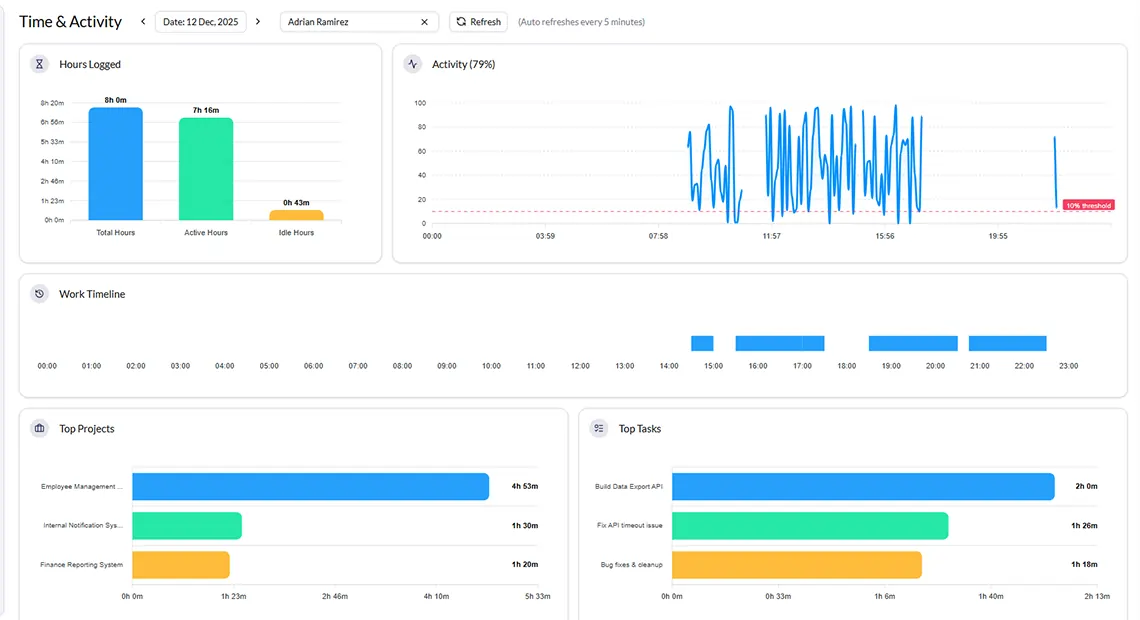
A Complete Daily View of Every Employee's Work Hours
Get full visibility of time and activity with screenshots of your team. Track real work through consistent updates, activity logs, and measurable output, so you always know who is working on what and what has been completed.
Automatic Screenshot Capture
Screenshots are taken at admin-set intervals during work hours, timestamped, grouped by time slot, and shown in the Time and Activity dashboard.
Activity Level Tracking
Measure engagement using keystrokes and mouse movement data. Identify active work periods and detect idle time with accuracy.
Offline Tracking & Auto-Sync
The desktop app stores activity and screenshots locally during internet downtime. All data syncs automatically once the connection returns.
Project and Task Level Time Tracking
Track time spent on each project and its individual tasks to understand effort distribution and productivity.
Real-Time Dashboard (1-Min Refresh)
Time & Activity dashboard auto-refreshes every minute. You get near-real-time visibility without manual refreshing, You can also trigger updates instantly when needed.
App and Website Usage Analytics
Analyze application and website usage during work hours. Understand where time goes with detailed activity insights.
Monitoring Built on Transparency and Trust
Monitor360 is designed for ethical oversight. You get the visibility you need as a manager while employees work in an environment that's fair, clear, and respectful.
Tracking Starts Only on Clock-In
Monitoring is strictly limited to active work sessions. Personal time is never tracked.
Admin-Controlled Screenshot Settings
You set the screenshot time frequency, interval, and retention policy. Employees aren't surveilled; they're monitored fairly.
No Personal Data Collection
Monitor360 tracks only work related activity, only no personal files, personal browsing, or private communications.
Transparent to Employees
Best practice is to disclose monitoring policies during onboarding. Monitor360 supports open, honest implementation.
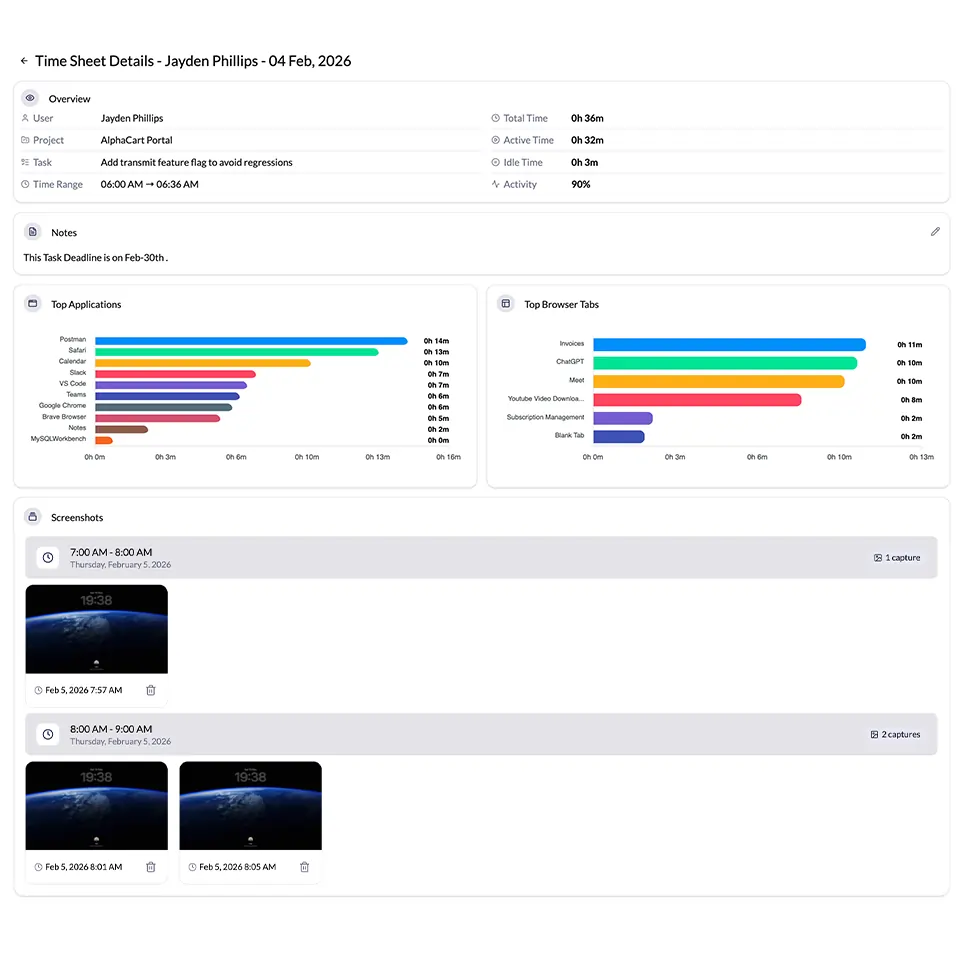
Why Use Time Tracking Software with Screenshots
Screenshots transform time logs from numbers into verifiable proof reducing disputes, improving accountability, and giving managers real clarity without micromanagement.
-
Reduce time theft with visual proof of work
-
Improve team accountability without constant supervision
-
Verify billable hours with timestamped screenshots
-
Identify productivity gaps using activity data
-
Build trust with clients through transparent reporting
Built for Teams That Need Real Visibility
Whether you manage remote developers, agency creatives, or enterprise support teams, time tracking with screenshots gives you the clarity to lead without micromanaging.
Remote Development Teams
Track Time in GitHub and other dev tools, with screenshot evidence confirming active coding sessions and sprint contribution without constant check-ins.
Marketing & Creative Agencies
Agencies monitor time across client projects, verify tool usage, and generate visual proof of work for client billing reports.
BPO & Call Centers
Ensure agents use correct applications during shifts, monitor activity against minimum thresholds, and maintain audit logs for compliance and quality.
Freelancers & Contractors
Provide clients with timestamped screenshot evidence and precise time logs for every hourly engagement. Build trust and reduce billing disputes.
IT & Software Companies
Track development, testing, and support productivity, identify bottlenecks, monitor sprint focus, and correlate app usage with project milestones.
Frequently Asked Questions
Everything you need to know about time tracking with screenshots in Monitor360.
Monitor360 automatically captures screenshots at admin-configured intervals while employees are clocked in. Each screenshot is timestamped and grouped by time slot. Data auto-refreshes every 5 minutes. Admins can review or delete any screenshot from the daily Time & Activity view.
Monitor360 is designed for ethical, transparent monitoring. Tracking only begins when employees clock in. Admins control screenshot frequency and can delete captures at any time. No personal data is collected. For full GDPR compliance, we recommend disclosing your monitoring policy to employees during onboarding.
The Time & Activity dashboard auto-refreshes every 1 minute, ensuring you always have near-real-time visibility into employee activity. You set an auto refresh interval or refresh manually for an updated data view.
Monitor360 tracks all desktop applications and browser tabs used during clocked-in work hours. The Top Apps section shows total time per application. The Top Browser Tabs section identifies work-related vs. non-work-related browsing patterns.
Yes. Monitor360 supports offline tracking. The desktop agent continues capturing time and activity data locally when the internet is disconnected. All data including screenshots syncs automatically once connectivity is restored, ensuring no work periods are missed.
Freelancers and contractors use Monitor360's screenshot feature to provide hourly work proof to clients with timestamps. This reduces billing disputes, builds client trust, and provides clear documentation for every invoice.
